
 By
By 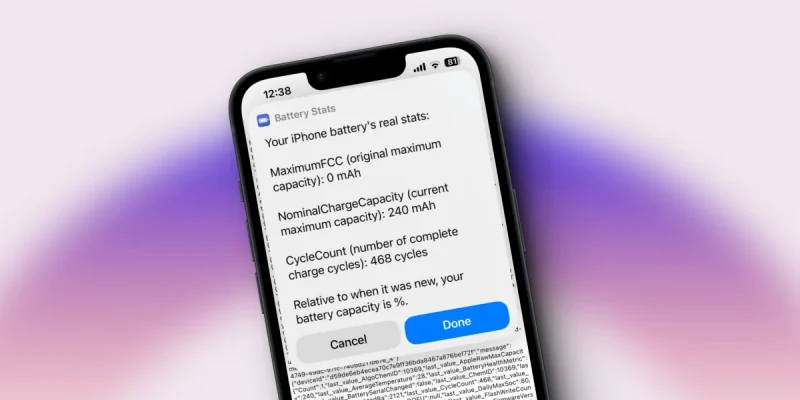
Cycle Count in iPhone refers to the number of complete charge cycles your battery has gone through. One cycle equals 100% of battery capacity used. This can happen in a single day or across multiple partial charges. For example, if you used 50% one day and 50% the next, that counts as one cycle.
Apple designs iPhone batteries to retain up to 80% of their original capacity at 500 charge cycles under normal conditions. Once you’re past that point, you’ll notice shorter battery life, and in some cases, unexpected shutdowns. Knowing your cycle count helps you decide whether a battery replacement is worth it before upgrading your phone entirely.
Cycle Count vs. Battery Health: What’s the Difference?
These are related but not the same thing. Cycle count is a raw number – how many times the battery has been fully discharged. Battery health is a percentage shown in Settings that reflects actual capacity relative to when the battery was new.
A low cycle count with poor battery health can happen if the phone was exposed to heat frequently. Conversely, a high cycle count doesn’t always mean terrible health – gentle charging habits can preserve capacity even after hundreds of cycles.
Cycle Count at a Glance
| Cycle Count | Estimated Battery Health | What to Expect | Action |
| 0 – 200 | 95% – 100% | Like-new performance | Nothing needed |
| 200 – 400 | 85% – 95% | Slight reduction in peak charge | Monitor regularly |
| 400 – 600 | 75% – 85% | Noticeable drop in battery life | Consider replacement |
| 600 – 800 | 60% – 75% | Frequent charging needed | Replacement recommended |
| 800+ | Below 60% | Possible unexpected shutdowns | Replace battery now |
How to Check Cycle Count on Your iPhone
Apple doesn’t show cycle count directly in Settings – but there are two main ways to find it:
- Via macOS System Report (most accurate): Connect your iPhone to a Mac, open System Information, go to USB, select your iPhone, and look for “Charge Count.”
- Via iPhone Diagnostics: Dial *#3001#12345#* to access Field Test mode on some carriers, though this shows limited battery data.
- Via third-party apps: Apps like iMazing (Mac/PC) or coconutBattery can read battery cycle data when your iPhone is connected.
When Should You Replace the Battery?
Apple’s official recommendation is to consider battery replacement when capacity drops below 80%. You’ll see this flagged in Settings > Battery > Battery Health & Charging.
But honestly – replace it when it starts affecting your day. If you’re charging at noon when you used to make it to evening, or if your phone shuts down unexpectedly, it’s time. Apple’s official battery replacement service costs around $99 for most models.
How to Extend Battery Life and Slow Cycle Accumulation
Small habits add up over time. Here’s what actually works:
| Habit | Why It Helps |
| Charge between 20% and 80% | Avoids deep discharge and overcharge stress on the cells |
| Use Optimized Charging | iOS learns your schedule and slows charging to reduce stress |
| Avoid extreme temperatures | Heat degrades battery chemistry faster than anything else |
| Don’t sleep with phone charging | Keeping battery at 100% overnight adds unnecessary heat and charge cycles |
| Use Low Power Mode during heavy days | Reduces draw and preserves charge, slowing cycle accumulation |
Bottom Line
Cycle count is one of the best indicators of battery age on an iPhone. Keep it in mind when buying a used iPhone – a device with 800+ cycles might need a battery replacement within months. For your own phone, good charging habits can meaningfully extend the battery’s useful life and save you money in the long run.











Comments